



The Short Answer
A DSLR or mirrorless camera paired with a lightning trigger will out-perform a phone at this, and it isn't close. Manual exposure control, a real sensor, bulb mode, and a trigger that fires in about 1 millisecond together solve the actual problem, which is that a lightning strike is over long before a human can react to it.
That said, a modern phone is no longer useless here. With a manual camera app and a stable mount, an iPhone can produce a publishable lightning photo at night. What it can't reliably do is daytime lightning, and it won't match a larger sensor for detail or noise. The right answer depends on whether you're building a portfolio or capturing the storm that happens to be overhead right now.
DSLR vs Smartphone at a Glance
|
DSLR or mirrorless |
Smartphone |
|
|---|---|---|
|
Manual shutter control |
Full, including bulb mode |
Only through a third party app |
|
Trigger support |
Yes, 1 ms detection with Smart+ |
Limited, app-based detection |
|
Daytime lightning |
Yes, with a trigger |
Unreliable |
|
Low light quality |
Larger sensor, cleaner files |
Smaller sensor, more noise |
|
Lens options |
Interchangeable, wide to telephoto |
Fixed focal lengths |
|
Setup time |
Several minutes |
Under a minute |
|
Best for |
Portfolio work, daytime storms, large prints |
Spontaneous night storms, social sharing |
Why Lightning Is Hard to Photograph At All
Before comparing the tools, it's worth being clear about what makes this difficult, because it explains every recommendation that follows.
A lightning flash lasts a fraction of a second. Human reaction time, from seeing something to pressing a button, runs roughly 200 to 250 milliseconds on a good day. By the time your finger moves, the bolt is gone. This is not a skill problem that practice fixes, and it's why experienced storm photographers don't try to time the shutter by hand.
There are only two workable solutions. Either hold the shutter open long enough that a strike happens while it's already recording, which is what bulb mode does at night, or use a device that reacts faster than you can. The second option is the only one that works in daylight.
DSLRs and Mirrorless: Precision and Control
A dedicated camera brings four advantages to storm work.
Full Manual Control
Setting shutter speed, aperture, and ISO independently is what lets you expose the foreground correctly while the bolt itself, which is far brighter, doesn't blow out. Most lightning work sits around ISO 100 with an aperture between f/5.6 and f/11.
Interchangeable Lenses
A wide angle captures more sky and improves your odds of the strike landing in frame. A longer lens isolates a distant cell. Being able to change that decision per storm matters more than it sounds, since you rarely know in advance how close the activity will be.
Bulb Mode
Bulb holds the shutter open for as long as you want, which at night effectively turns the camera into a net. If the shutter is open when a bolt fires, you catch it. This is the classic approach and it still works.
Trigger Support
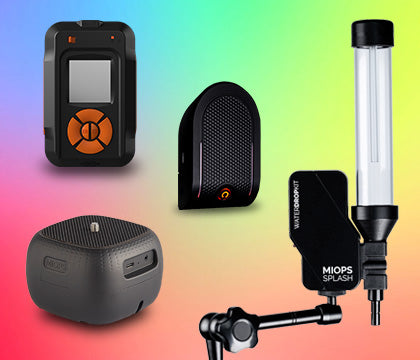
This is the one that changes outcomes most. The MIOPS Smart+ has a dedicated Lightning mode that detects a strike in as little as 1 millisecond and fires the camera automatically. It works with more than 500 DSLR and mirrorless bodies across Canon, Nikon, Sony, Fujifilm, Panasonic, and Olympus using the matching cable, and it also covers Sound, Laser, Timelapse, HDR, and Long Exposure modes.
The reason a trigger matters beyond convenience is daylight. A daytime exposure long enough to catch a random strike would completely overexpose the sky, so the bulb-mode-as-a-net approach falls apart. Reaction speed is the only path, and no human has it.

Smart+ Multi-Mode Camera Trigger | Lightning, Sound, Laser and Timelapse
Take almost impossible photos by turning your camera into a high-speed capture device! MIOPS Smart Trigger is a versatile camera...
1 ms lightning detection, 500+ compatible cameras, seven shooting modes.
Smartphones: Always in Your Pocket
The case for the phone isn't that it beats a camera. It's that it's already with you when the storm arrives, and the best camera for an unexpected storm is the one you're holding.
Where Phones Genuinely Work
-
Night storms with frequent, bright strikes. A long exposure from a manual app has a reasonable chance of catching one.
-
Wide establishing shots where you want the storm in its landscape rather than a tight crop of the bolt.
-
Fast, spontaneous situations where setting up a tripod and cable would mean missing the storm entirely.
-
Social sharing, where the file goes straight from capture to post without an edit.
Where Phones Fall Short
-
Daytime lightning. Without fast event detection and with limited exposure control, this is largely out of reach.
-
Noise and detail. A small sensor working in the dark produces noisier files with less recoverable shadow detail, which shows up quickly in large prints.
-
Consistency. You can get a good phone lightning shot. Getting them repeatedly, on demand, is a different proposition.
Getting the Most From a Phone
The native camera app won't do this on its own, because it has no manual shutter control. A manual camera app such as Snap Pro Camera gives you manual shutter control plus dedicated long exposure modes, which is the functionality you need. Pair it with MIOPS Spark, an ergonomic iPhone grip with tripod mounting and Apple Watch remote triggering, and you've removed the two biggest sources of failure.
Those two failures are always the same: no shutter control, and a phone that moves mid exposure. Spark works with iPhones running iOS 16 or later.
Camera Settings for Each Approach
DSLR or Mirrorless at Night
-
ISO 100, aperture f/5.6 to f/11, bulb mode or a long exposure of 10 to 30 seconds.
-
Manual focus set to infinity and confirmed in a zoomed live view before the storm gets close.
-
With a trigger, set Lightning mode and start sensitivity around 1 to 2 percent, adjusting as you see results.
DSLR or Mirrorless in Daylight
-
Expose for the ambient scene, typically 1/200 to 1/500 depending on conditions.
-
A trigger is not optional here. This is the scenario that separates the two approaches entirely.
Smartphone at Night
-
Manual camera app in a long exposure or motion blur mode, starting around 10 to 30 seconds.
-
Lowest available ISO, since noise is the phone's weakest point in the dark.
-
Mounted on a tripod or grip, triggered by timer or remote so touching the screen doesn't shake the frame.
Composition Matters More Than Either Camera
A technically perfect bolt against an empty black sky is a documentation shot, not a photograph. The frames people remember have something else in them, and this is one area where the phone and the DSLR start on equal footing.
-
Put a static anchor in the frame. A ridgeline, a building, a lone tree, a pier. The bolt reads as scale and drama only when there's something to measure it against.
-
Shoot wider than feels right. You don't know where the next strike will land, and a wide frame improves your odds of having it inside the composition at all.
-
Work the blue hour. A storm arriving near dusk lets you hold colour in the sky rather than pure black, and that sky does more for the image than any sensor upgrade.
-
Keep the horizon level. It sounds trivial, but a tilted horizon is the fastest way to make an otherwise strong storm frame look accidental.
These decisions cost nothing and apply whichever device you're holding, which is worth remembering before assuming better gear is the upgrade you need.
Staying Safe in a Storm
This matters more than any gear decision in the article. The National Weather Service is direct about it: no place outside is safe when thunderstorms are in the area, and if you can hear thunder, lightning is close enough to strike you.
Their guidance is to move to a substantial building with electricity or plumbing, or an enclosed metal-topped vehicle with the windows up, and to stay there for at least 30 minutes after the last thunder. Shooting from inside a vehicle is the standard approach for a reason, and a remote trigger is as much a safety feature as a creative one, because it lets you set the camera up and then step away from it.
Avoid elevated terrain, isolated trees, and open water, and keep clear of conductive structures like fences and power lines.
So Which Should You Use?
-
Building a portfolio or planning to print: DSLR or mirrorless with a trigger. The sensor and the frame selection both matter at that level.
-
Shooting daytime storms: DSLR or mirrorless with a trigger. Nothing else does this reliably.
-
A storm just started and your camera is at home: your phone with a manual app, mounted on something solid.
-
Starting out and not sure how much you'll shoot: start with the phone and a manual app. If you find yourself chasing storms deliberately, that's the signal to move up.
-
Already shooting storms regularly without a trigger: a trigger is the single upgrade that will change your keeper rate most.
Common Mistakes and Why They Happen
Trying to time the shutter by hand is the fundamental one, and it produces empty frames on both platforms. Use bulb mode at night or a trigger in any light.
Leaving autofocus on costs more shots than any other setting. In the dark, autofocus hunts and often fails to lock at all. Set focus to infinity manually and verify it before the storm arrives.
Overexposing the bolt usually means the aperture was too wide. Lightning is extremely bright, so narrowing to f/8 or f/11 often fixes a blown-out strike in a single adjustment.
Shooting a phone handheld is the phone-specific version of the same problem as camera shake. Anything longer than a fraction of a second needs a mount.
Frequently Asked Questions
Can you photograph lightning with a smartphone?
Yes, at night, using a manual camera app that gives you long exposures and a stable mount. The native iPhone camera app has no manual shutter control, so a third party app is required. Daytime lightning is largely out of reach for a phone.
Is a DSLR better than a smartphone for lightning photography?
Yes, clearly. A DSLR or mirrorless camera offers full manual control, bulb mode, interchangeable lenses, a larger sensor for cleaner low light files, and support for a trigger that detects strikes in about 1 millisecond. A phone's advantage is that it's already with you.
Do I need a lightning trigger?
At night you can work without one using bulb mode, though a trigger substantially improves your keeper rate. In daylight a trigger is effectively required, because an exposure long enough to catch a random strike would overexpose the sky.
What camera settings should I use for lightning photography?
At night start with ISO 100, an aperture between f/5.6 and f/11, and bulb mode or a 10 to 30 second exposure. In daylight expose for the ambient scene, usually around 1/200 to 1/500, and let a trigger handle release timing. Use manual focus set to infinity in both cases.
How fast does a lightning trigger need to be?
Fast enough to beat human reaction time, which is roughly 200 to 250 milliseconds. The MIOPS Smart+ detects a strike in as little as 1 millisecond, which is what allows it to capture strikes in daylight when a long exposure isn't an option.
Which iPhone app is best for lightning photography?
You need an app with manual shutter control and long exposure support, because the native Camera app has neither. Snap Pro Camera provides manual shutter control and dedicated long exposure modes, and pairs with the MIOPS Spark grip for stability and remote triggering.
Is it safe to photograph lightning?
Only with precautions. The National Weather Service advises that no place outside is safe during a thunderstorm and that audible thunder means lightning is close enough to strike you. Shoot from inside a vehicle or building, use a remote trigger so you can step away from the camera, and wait 30 minutes after the last thunder before going back out.
Keep Exploring
Related reading: Choosing the Right Gear for Lightning Photography
Related reading: Lightning Types and Classifications
Gear, settings, and technique for storm season.
Sources
National Weather Service, Lightning Tips (shelter guidance and the 30 minute rule): https://www.weather.gov/safety/lightning-tips
MIOPS Smart+ product page (1 ms detection, 500+ compatible cameras, mode list, current price): https://www.miops.com/products/smart
MIOPS Spark Travel Pack (iPhone grip, iOS 16 or later, Apple Watch remote): https://www.miops.com/products/spark-travel-pack