



The Short Answer
Almost every failed lightning photo comes down to one of three problems, and the good news is that each one has a clear, specific fix.
Blurry means focus or camera shake. Set your lens to manual focus, use live view to lock onto a distant point, mount the camera on a tripod, fire with a remote release, and switch stabilization off.
Blown out means too much exposure. Shoot in full manual at ISO 100, start at f/8 and stop down if channels are clipping, keep exposures shorter than you think you need to, and expose for the sky rather than the bolt itself.
Empty means you missed the strike entirely. At night, run consecutive long exposures with no gap so a bolt is always more likely to fire while your shutter is open. In daylight, accept that human reaction time is not fast enough and that a trigger is the only reliable solution.
Shoot RAW throughout. Without it you are leaving recoverable data on the table every single session.
We have looked at a lot of lightning photos over the years, and the failures are remarkably consistent. It is rarely a case of bad luck or wrong location or a poor camera. The bolt was there. Something in the setup let it slip away. The frustrating part is that these failures are almost always preventable once you know what to look for, and the fixes are not complicated. This guide walks through each failure mode, what is actually causing it, and exactly what to change. If you want the precise settings to dial in once you have the fundamentals sorted, see our lightning photography camera settings guide for the specific numbers.
Problem 1: Your Lightning Photos Come Out Blurry
Blurry lightning shots hide behind two completely different causes, and treating the wrong one wastes time. Before you change anything, figure out which kind of blur you are dealing with.
Cause A: Focus, the one that fools everyone first
This catches more photographers than any other issue. During the day, autofocus works reliably because there is enough contrast in the scene for the camera to grab. But the moment the sky goes dark, the camera struggles. It starts hunting, cycling back and forth, and the frames it produces during that hunt range from slightly soft to completely unusable. The trap most people fall into is switching to manual focus and then trusting the infinity mark on the barrel, which sounds logical but does not work. Most modern lenses focus slightly past infinity, so that mark is decorative at best.
The correct approach is to take focus into your own hands and verify it visually. Switch to manual, open live view, zoom in digitally to 100 percent on a bright, distant point, ideally a star, a radio tower warning light, or a building edge far away, and turn the focus ring until that point is as sharp as you can make it. Then tape the ring. A small strip of gaffer tape across the focus ring and barrel means that even if you bump the lens while repositioning, nothing shifts. It sounds overly cautious until you come home from a three-hour session and find that every sharp bolt frame has a slightly soft sky, which means the ring crept.
There is one more focus trap worth flagging. If something bright and close comes into frame during your session, like a vehicle headlight or a nearby streetlight flickering on, and you let the camera briefly switch to autofocus to chase it, you may not notice that it has shifted focus to that object. The storm, sitting miles away, is now outside your depth of field. It will look soft even if the nearby object looks sharp. Always confirm focus on the distant point before you run a fresh series of exposures.
Cause B: Camera shake, the one that hides in plain sight
If your focus is locked correctly and frames are still coming back soft, the camera moved during the exposure. Lightning photography uses long exposures, sometimes well over ten seconds, and the smallest amount of vibration shows up clearly. There are two sources that catch people off guard.
The first is the physical act of triggering the shot. Pressing the shutter button transmits vibration directly into the camera body, and on a lightweight tripod it can take several seconds for that vibration to dampen out. The solution is a remote release or an intervalometer that fires the camera without contact. If you do not have either, the two-second self-timer is a reasonable workaround.
The second is image stabilization. This one surprises people because it sounds like it should help. But stabilization systems are designed to counteract movement, and when you mount the camera on a tripod, there is no movement for the system to work with. Some systems handle this gracefully; others introduce small corrections in response to vibrations they perceive as real, which creates micro-blur in long exposures. The standard advice, and the correct advice, is to switch stabilization off for any exposure where the camera is on a solid support. Check both the switch on the lens barrel and the separate in-body stabilization setting in your camera menu, because they operate independently.
A useful diagnostic: if the entire frame is soft including stars and distant lights, it is a focus problem. If stars and lights are present but show a doubled or streaked quality, particularly in one direction, it is shake.
Problem 2: Your Lightning Bolts Come Out Blown Out
Lightning is probably the brightest natural event a camera sensor will ever encounter. The core of a return stroke is roughly 30,000 degrees Kelvin, which is several times hotter than the surface of the sun. Exposure is not a gentle challenge here. It demands respect.
What catches photographers off guard is the mechanism. The standard approach for night lightning is to hold the shutter open for many seconds, which increases the probability of a bolt firing during that window. The problem is that the sky is not static during those seconds. It is accumulating light the entire time. Ambient glow from cities, moonlight, and even diffuse starlight add up, and at a certain point the sky brightness starts to push the bolt toward the edge of recoverable exposure. You end up in a situation where the very technique that improves your odds of capturing a bolt is also the thing that blows out the frame when you do.
The fix requires a few adjustments working together, not just one change in isolation.
Shoot in full manual mode. Automatic and semi-automatic modes respond to the sudden brightness spike of a lightning bolt by shifting exposure mid-sequence, and the resulting inconsistency across frames is genuinely difficult to work around in post.
Start at ISO 100 and stay there. Lightning provides all the light you need. A higher ISO only adds noise to the sky and increases the chance of clipping highlights.
Begin at f/8 and stop down toward f/11 if bolts are very close or particularly bright. Stopping down also increases depth of field, which helps if you are including a foreground subject.
Expose for the sky, not the bolt. Set your base exposure so the ambient sky looks correct, then let the bolt push into the upper end of the histogram. Some photographers expose the sky a stop dark intentionally, leaving headroom for the brightest possible strike.
Read the histogram, not the rear screen. In darkness the rear screen is unreliable because your eyes adapt to the dark and the image looks brighter than it is. A correctly exposed bolt on the histogram is a tall, narrow spike sitting close to the right edge but not touching it. If you see a wide mass of pixels crushed against the right wall, the sky or the bolt is clipping.
Shoot RAW. A bolt that appears clipped on the JPEG preview often has several stops of recoverable data sitting in the RAW file. Do not write off a frame until you have opened it in a RAW processor and pulled the highlights down.
One thing worth knowing for Olympus and Panasonic mirrorless users: both brands offer a mode called Live Composite, which builds a frame by only adding pixels that are brighter than the base exposure. The sky stops accumulating light after the first frame, which means you can run extremely long composite exposures without the sky blowing out. It is a thoughtful solution to exactly this problem. Canon, Nikon, and Sony do not have an equivalent, so those shooters are working with the traditional approach.
Problem 3: Your Frames Come Out Empty With No Bolt at All
Of the three failures, this one produces the most demoralizing card dumps. Everything looks right. The storm is active, the settings are dialed in, and you come home with nothing. Understanding why this happens differently at night versus during the day is what separates a productive storm session from an expensive waste of time.
At night: it is a probability problem, and it is solvable
The long exposure method works by leaving the shutter open long enough that a bolt is statistically likely to fire within the exposure window. The crucial thing people miss is that the method breaks down the moment there is any gap between exposures. If you are shooting 20-second exposures and spending five seconds reviewing each frame and deciding whether to shoot again, you are losing 20 percent of your potential capture window. In a storm that fires a bolt every 15 seconds, you are virtually guaranteeing missed strikes.
The solution is consecutive exposures with no pause. Set an intervalometer to fire continuously with a zero-second delay between shots, use a wide angle lens to cover as much sky as possible, pick your composition and leave it alone, and let the camera run. The wider your field of view and the smaller your gaps, the more the math works in your favor. Do not review frames during an active cell. Review afterward.
For a deeper look at making the most of the night long exposure approach, see our long exposure lightning photography guide.
In daylight: it is a physics problem, and reflexes are not the answer
Daytime lightning photography is where the most persistent and expensive misconception in storm photography lives. People assume that with enough practice, fast enough reflexes, and a camera set to burst mode, they can react to a bolt and press the shutter in time. They cannot. Nobody can.
Here is the reality. A typical lightning flash lasts around 0.2 seconds from first leader to final return stroke. The visible return stroke, the part that looks bright, can be as short as a few milliseconds. The average human visual reaction time is around 250 milliseconds just to begin a physical response, not complete it, just initiate it. By the time the signal from your eyes has reached your brain and your brain has sent the signal to your finger and your finger has depressed the shutter button, the bolt is over. It was over before you knew it was there. This is not a reflex problem. It is not a practice problem. It is a biological limit that applies equally to every person who has ever picked up a camera.
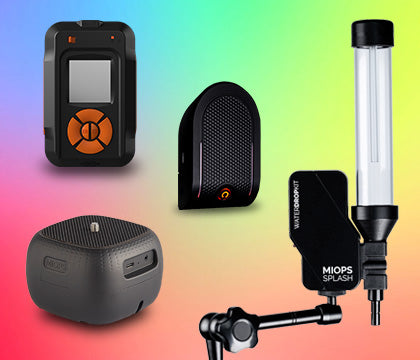
The reason we are confident about this is that we built a device specifically to solve it. The MIOPS Smart+ monitors the scene continuously and fires the shutter in approximately one millisecond when it detects a qualifying flash, day or night, in any lighting condition. It removes human reaction time from the equation completely. If you are trying to do daytime lightning photography by eye, you are going to come home with empty cards regardless of how good you are at everything else. A trigger changes the outcome of every session.
Worth being clear about what a trigger does and does not do: it handles timing only. Your focus still has to be correct, your exposure still has to be right for the ambient conditions, and your composition still has to be pointing at the active part of the storm. A trigger on a poorly set up camera produces sharp, correctly triggered, completely wrong shots. For the full daytime workflow, see our daytime lightning photography guide.
And occasionally: it is just framing
Worth mentioning because it is more common than people admit. If your lens is longer than about 24mm on full frame, you are covering a relatively small portion of sky. Storms drift, the active cell shifts, and the bolts start landing outside your frame. If you are coming home with empty cards and you know your settings are right and you were watching an active storm, check your focal length. Go wider, watch where the most frequent strikes are occurring, and repoint the camera. Composition adjustments during a session feel disruptive but they matter.
A Quick Diagnosis Before You Change Anything
Blurry, full frame including stars and lights: focus drift. Fix with manual focus locked onto a distant point and confirmed in live view.
Blurry with a directional quality or doubled point lights: camera shake. Fix with remote release and stabilization off, both lens and body.
Bold white channels with no internal detail: overexposed bolt. Stop down, lower ISO, expose darker, review histogram not screen.
Sky milky and washed out: accumulated ambient exposure. Shorten exposure window, lower ISO, consider stopping down slightly.
Card empty, storm active, night: gap between exposures. Switch to continuous intervalometer with no pause between shots.
Card empty, storm active, daylight: reaction time limit. Use a lightning trigger.
Frequently Asked Questions
Why are my lightning photos blurry even when I am using a tripod?
Usually one of two things. Image stabilization left switched on can introduce micro-vibration on a stable support as the system chases movement that is not there. Or there is physical contact between you and the camera at the moment of shutter release. Switch stabilization off on both the lens and the camera body independently, and use a remote release or intervalometer so you never touch the body during an exposure.
Why is my lightning bolt pure white with no visible channel structure?
The bolt is overexposed, which is extremely common because lightning is far brighter than the ambient sky you are metering for. Shoot at ISO 100 without exception, stop down from f/8 toward f/11, keep exposures shorter than your instinct suggests, and expose for the ambient sky rather than the bolt. Always shoot RAW because what looks clipped on screen may still have recoverable data in the file.
Why do I keep missing the bolt entirely?
At night it is almost always a gap between your exposures. An intervalometer with zero delay between shots eliminates that window. In daylight it is human reaction time, which is biologically incapable of catching a flash that can last only a few milliseconds. A lightning trigger solves the daytime problem completely.
Can you photograph lightning during the day without a trigger?
Reliably, no. The long exposure method that works at night requires keeping the shutter open for seconds or minutes, which is impossible in bright daylight without severe overexposure. And reacting to a visible bolt is not physically possible given how short the flash duration is relative to human reaction time. Daytime lightning photography requires a dedicated trigger. See our daytime lightning photography guide for the complete approach.
What shutter speed should I use for lightning photography?
At night, bulb mode with exposures between 5 and 30 seconds depending on storm activity and ambient light levels. In daylight, expose for the ambient scene at whatever shutter speed produces a correct exposure, typically somewhere between 1/200 and 1/1000, and let the trigger handle the rest. For specific starting numbers in different conditions, the lightning photography camera settings guide has everything laid out.
Is a lightning trigger actually worth it or is it a crutch?
Calling it a crutch implies there is a skill-based alternative, and there is not for daytime work. No amount of practice makes a human reflex faster than a few hundred milliseconds, and the flash you are trying to catch can be over in a fraction of that. At night the long exposure method works without a trigger and is a completely valid approach. In daylight, a trigger is the only method that produces consistent results. It is not a shortcut; it is the correct tool for the problem.
Sources
NOAA National Severe Storms Laboratory: Lightning FAQ (flash duration, return stroke timing): https://www.nssl.noaa.gov/education/svrwx101/lightning/faq/
NOAA JetStream: The Lightning Process (stroke sequence and timing): https://www.noaa.gov/jetstream/lightning